Claude Cowork Is Moving to the Cloud by Default: What That Means for Your Files, Memory, and Sensitive Data
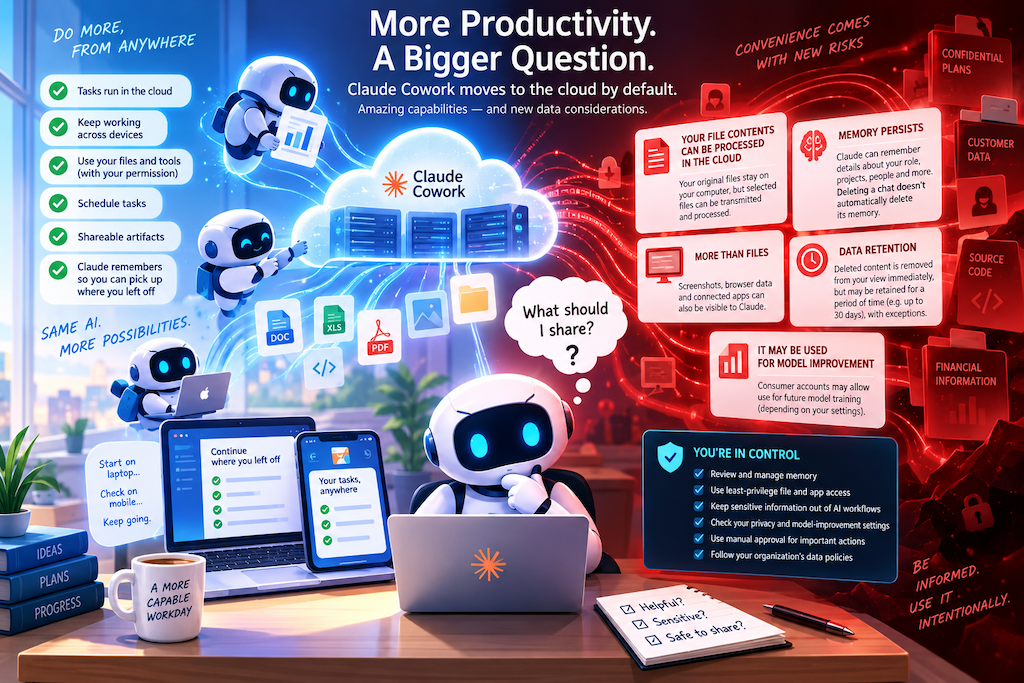
This morning an email from Anthropic caught my attention. Beginning September 2026, Cowork tasks are moving to cloud execution by default. The change brings obvious benefits: a task can continue after you close your laptop, you can start work from one device and review it on another, scheduled tasks no longer depend on your computer staying awake, and Claude’s Memory can follow you between regular Chat and Cowork.
The convenience is significant. So is the change in the security and privacy model.
The most important point is not that Anthropic is “moving your computer files into the cloud.” That would be an inaccurate description of what the company says happens.
The more precise finding is this:
Your local folders can remain physically on your computer while selected information from those folders is nevertheless transmitted to and processed in Anthropic’s cloud when a cloud Cowork task needs it. At the same time, Cowork sessions, associated files, Memory entries, artifacts and other account-level data can have persistence beyond the temporary environment in which the task executes.
That distinction deserves attention, especially for anyone using Claude with confidential business information, customer data, internal documents, source code, legal material or other sensitive information.
This article examines what Anthropic currently documents, what users should be careful not to assume, and some practical steps worth considering.
Important note: This article is an independent analysis of publicly available Anthropic documentation and product notices as of September 5, 2026. Product behavior, policies and documentation can change. It is not legal, compliance or information-security advice. Organizations handling regulated or contractually restricted information should conduct their own assessment with appropriate legal, privacy and security professionals.
What has actually changed?
Anthropic’s current Cowork architecture documentation says that Cowork sessions run in the cloud by default.
For cloud sessions, the “agent loop” and code execution operate in an isolated temporary environment on Anthropic-managed infrastructure. Anthropic also states that sessions and files are saved to the member’s Claude account.
That produces two very different layers of data that should not be confused.
The first is the temporary execution environment. This is the isolated sandbox in which Claude performs work.
The second is the persistent account data surrounding that execution: the session, conversation, files associated with it, Memory, artifacts and other information necessary to make the experience available later or across devices.
A temporary sandbox therefore does not necessarily mean that all data associated with a task disappears when execution ends.
That is one of the most important concepts for users to understand.
“Your files are not moving” — what does that mean?
Anthropic’s rollout notice emphasizes that folders remain on the user's computer.
That appears consistent with the technical documentation.
A cloud Cowork session does not automatically receive unrestricted access to an entire computer. Anthropic says local file access is mediated through the Claude Desktop application and restricted to folders a user has connected. The desktop application must also be available for a cloud session to reach those local resources.
However, the privacy-relevant question is not simply:
“Does my original file remain on my hard drive?”
It is:
“Does information from that file cross the local-device boundary?”
According to Anthropic, the answer can be yes.
Its architecture documentation states that because a cloud session executes on Anthropic’s infrastructure, its work — including local files opened through the desktop application — is processed on Anthropic’s servers rather than remaining solely on the device.
So both of these statements can be true at the same time:
- your original document remains in its original folder on your laptop; and
- the contents required by a Cowork task can be transmitted to and processed by a cloud service.
For privacy and information-governance purposes, the second statement is usually the more important one.
A useful mental model is therefore:
Local storage location and cloud processing are separate questions.
What appears to persist in the cloud?
Based on Anthropic’s current documentation, several categories deserve attention.
Cowork sessions and associated files
Anthropic states that cloud Cowork sessions and files are saved to the user’s Claude account. This is what enables the same work to be accessed from different devices.
This should not be confused with the temporary sandbox used to execute the task.
Memory
Memory is another persistent layer.
In August 2026, Anthropic announced that Claude Memory would work across regular Chat and Cowork in the cloud. Anthropic says Memory is enabled by default for Free, Pro and Max users, while Team and Enterprise organizations have it disabled by default unless the organization enables it.
Memory is particularly important because it is not merely a searchable copy of old conversations.
Anthropic describes information Claude may remember as including:
- your role, projects and professional context;
- people and places in your work and personal life;
- communication preferences and working style;
- technical preferences and coding style;
- project details and ongoing work.
In other words, Memory can become a compact, persistent representation of the context surrounding your work.
Artifacts
New Cowork artifacts are also account-level objects. Anthropic says artifacts created under its updated system are saved to the account, can be available through the web, can be shared within an organization, and maintain versions as they are updated.
Users creating dashboards, reports, trackers or other artifacts from confidential material should therefore think about the sensitivity of the resulting artifact independently from the sensitivity of the source files.
Screenshots and visible application data
Cowork’s computer-use and browser capabilities create another category of exposure.
To understand an application or webpage, Claude can take screenshots. Anthropic explicitly warns that information visible on the screen — including personal data, sensitive documents or private information about other people — may therefore be visible to Claude.
This matters because information does not have to originate in a file you deliberately upload.
It could be visible in:
- an email inbox;
- a CRM;
- an HR system;
- an internal dashboard;
- a browser tab;
- a messaging application;
- a notification;
- another document open on screen.
The effective data boundary can therefore be broader than “files I gave Claude.”
Memory deserves special attention
Of all the findings examined here, Memory may be the easiest to underestimate.
A traditional chat can feel temporary. You ask a question, receive an answer and move on.
Memory changes that model.
It is designed precisely so that Claude can retain useful context from one interaction and apply it later.
For productivity, that is valuable.
For privacy, it means users need to think about whether a particular piece of information should become durable account context.
Memory can reveal more through combination than individual facts suggest
Consider a collection of apparently ordinary memories:
- the user works on “Project Falcon”;
- the CFO is called Sarah;
- a board meeting occurs in October;
- an external adviser is involved;
- the project has a March deadline.
Individually, none necessarily looks highly sensitive.
Together, they might reveal something commercially significant.
The same aggregation problem can occur with technical information:
- cloud provider;
- production environment;
- repository;
- internal project name;
- security tooling;
- architecture;
- operational workaround.
Memory therefore creates a risk common to many profile-building systems:
low-sensitivity facts can collectively reveal high-sensitivity context.
This is not evidence that Anthropic is doing anything improper. It is an inherent consequence of making persistent contextual memory useful.
What does Claude intentionally exclude from Memory?
Anthropic has implemented restrictions.
By default, it says Claude does not save certain personal or sensitive subjects to Memory, including areas such as health, race, ethnicity, religious beliefs, politics and gender identity.
Users can explicitly enable an “Include sensitive topics in memory” option. Anthropic says that disabling the setting later removes sensitive items saved under that feature.
Anthropic also identifies several categories it says are never saved to Memory, even when a user asks for them. Its published examples include:
- government identification numbers;
- criminal history;
- financial account numbers;
- immigration status.
Those safeguards are meaningful. But users should not interpret them as a general confidentiality filter.
Anthropic’s published exclusion list does not amount to a promise that Claude Memory will automatically identify and exclude every type of commercially, professionally or contractually sensitive information.
For example, organizations may consider information such as the following sensitive even though it falls outside the categories above:
- confidential customer names;
- unreleased financial forecasts;
- acquisition or transaction plans;
- intellectual property;
- proprietary architecture;
- source-code details;
- security vulnerabilities;
- legal strategy;
- employee matters;
- contract terms;
- product roadmaps;
- internal incident information.
The appropriate question is therefore not simply:
“Does Claude classify this as a sensitive Memory topic?”
It is:
“Would I be comfortable with this information becoming persistent account context?”
Those are not the same test.
Deleting a conversation does not necessarily delete the Memory it created
This is perhaps the most important operational detail.
Anthropic states that when a conversation is deleted or expires, related Memory entries generated from it are not automatically removed.
Users must separately manage those Memory entries. Anthropic also states that Memory data is included in data exports.
Consider what that means in practice.
You might discuss a confidential project in a conversation. Claude could derive a persistent Memory topic from that conversation. You could later delete the original chat, believing that you have removed the sensitive context.
The Memory entry may remain. The appropriate mental model is therefore:
Deleting the conversation and deleting Memory are separate actions.
Anyone using Memory with professional or sensitive material should periodically inspect Settings → Memory rather than treating conversation cleanup as sufficient.
Retention is another area where terminology matters
“Deleted” does not necessarily mean “immediately erased from every backend system.”
For Anthropic’s commercial offerings that allow users to save ongoing conversations, Anthropic says a deleted conversation disappears from chat history immediately and is deleted from backend storage systems within 30 days. It also describes exceptions relating to legal requirements, enforcement of its Usage Policy and certain safety processes.
Anthropic says sessions flagged by automated trust-and-safety systems for Usage Policy violations may have inputs and outputs retained for up to two years, while certain trust-and-safety classification scores can be retained for longer.
These are retention policies, not evidence that deleted ordinary conversations are routinely kept indefinitely.
But they illustrate why users should distinguish between:
removal from the visible product interface and completion of backend deletion.
Organizations with strict retention obligations should assess Anthropic’s contractual retention terms rather than relying only on the behavior visible in the application.
Consumer accounts and business accounts are not equivalent
A second major distinction is the type of Claude account being used.
Free, Pro and Max
For consumer products, Anthropic provides a setting called “Help Improve our AI models.”
Anthropic says that when users opt out, new chats and coding sessions will not be used for future model training. It also notes that conversations flagged for safety purposes may still be used for trust-and-safety-related work.
Users working with confidential information on a consumer account should therefore review this setting rather than assuming a particular training preference.
There is an important wording limitation here.
Anthropic’s consumer model-improvement documentation expressly describes “chats and coding sessions.” Its public language does not necessarily enumerate every data object generated by every newer Cowork feature in the same level of detail.
For that reason, this article does not claim that every Cowork file, artifact or Memory entry is necessarily used for model training when the setting is enabled.
The safer conclusion is simply:
If limiting future model-training use matters to you, inspect and configure the privacy setting rather than relying on assumptions.
Team and Enterprise
The commercial position is different.
Anthropic states that, by default, it does not use inputs or outputs from its commercial products to train its generative models, subject to exceptions such as users deliberately submitting feedback or otherwise agreeing to data use.
For organizations using Claude for Work, Anthropic describes the customer organization as the controller of submitted data and Anthropic as a processor acting on its behalf under the commercial agreement.
This is an important privacy distinction.
It does not, however, mean that corporate Claude activity is necessarily private from the organization operating the account.
Primary Owners of Team and Enterprise organizations can export organization data, including conversation and user data. Anthropic separately states that Memory data is included in data exports.
Employees should therefore treat a company-managed Claude workspace as a company system, not as a private personal notebook.
Where is business data stored?
Data residency can matter for regulated organizations and companies with contractual requirements concerning international transfers.
Anthropic’s current documentation for its commercial products states that data may be processed through several geographic regions and that data is stored in the United States by default, unless other arrangements or product-specific controls apply.
This does not automatically make use of Claude unlawful for European or Swiss organizations. International data transfers depend on contractual arrangements, applicable law, the categories of information involved and the organization’s own compliance obligations.
But it does mean users should not equate having a European or Swiss account with a guarantee that business data remains physically within Europe.
Organizations subject to GDPR, the Swiss Federal Act on Data Protection, healthcare rules, financial-services requirements or contractual residency obligations should verify the applicable terms rather than making assumptions about storage location.
The risk is not simply “cloud versus local”
It would also be misleading to imply that local execution is automatically safe while cloud execution is unsafe.
Cloud systems can benefit from strong isolation, access controls, encryption, monitoring and professional security operations. Anthropic states that Claude consumer information is encrypted both in transit and at rest and describes restrictions on employee access to conversations.
The more useful security question is:
What information is available to the system, where can it travel, how long can it persist, and who can access or control it?
Moving Cowork into the cloud changes some of those answers.
It also increases the usefulness of account security.
Once Cowork sessions, Memory, artifacts and other work become available across devices, compromising the Claude account itself could potentially expose a broader collection of useful context than compromising a single local task.
Strong authentication and device/session hygiene therefore become more important, not less.
Agentic AI introduces another category of risk
There is also a difference between an AI chatbot that reads text and an AI agent that can act.
Cowork can interact with files, browsers, applications and connected services.
That creates risks unrelated to ordinary cloud storage.
One is prompt injection.
A malicious or compromised webpage, email, document or third-party tool could contain instructions designed to influence an AI agent into taking an unintended action.
Anthropic explicitly acknowledges that browser-based AI agents can be targeted in this way and says its safeguards reduce rather than eliminate the risk.
Another is over-broad permissions.
If an agent is allowed to access an entire folder when it needs only three documents, the potential exposure is larger than necessary.
The principle that should guide AI-agent permissions is the same one security teams have used for decades:
least privilege.
Give the system access to what it needs, not everything it might conceivably use.
What information should users be particularly careful with?
The appropriate boundary depends on your organization, applicable law and contractual obligations.
However, the following categories deserve additional scrutiny before being exposed to any cloud AI assistant:
Credentials and authentication material
Passwords, API secrets, authentication tokens, cryptographic private keys, recovery codes and cryptocurrency seed phrases should not be treated as ordinary AI context.
Regulated personal data
Medical records, financial information, government records and other regulated personal information can trigger legal and contractual obligations.
Anthropic itself recommends against using computer-use capabilities for financial accounts, healthcare information, legal documents and applications containing other people’s personal information.
Information about other people
AI privacy is not only about the person using the AI.
Customer records, candidate information, employee information, private communications and data about colleagues can all enter a workflow through documents, browsers, email or screenshots.
The fact that you are authorized to see the information does not necessarily mean you are authorized to send it to every external processor.
Legally privileged or strategically sensitive material
Legal advice, litigation strategy, transaction documents, investigation records and contract negotiations can require special handling.
Whether use of an AI system affects confidentiality or privilege depends heavily on jurisdiction, contractual arrangements and circumstances. This is a question for qualified counsel, not something users should decide based solely on a product’s privacy setting.
Trade secrets and confidential business information
Source code, proprietary methods, product plans, internal financials, M&A activity, vulnerabilities and unreleased research may have little or no connection to traditional categories of “sensitive personal data” while still being among an organization’s most valuable information.
This is why relying only on an AI product’s “sensitive topic” detection is insufficient for business confidentiality.
Practical steps users can take
Users do not necessarily need to disable Cowork or Memory entirely.
The goal should be to make their use intentional.
1. Review what Claude currently remembers
Open Settings → Memory and inspect the stored topics.
Ask yourself whether each item is something you would deliberately place into a persistent cloud profile associated with your account.
Remove information that does not belong there.
2. Keep sensitive-topic Memory disabled unless you genuinely need it
Anthropic keeps certain sensitive categories out of Memory by default.
For most users, there is little reason to broaden that scope unless the benefit is clear.
3. Remember that chat deletion and Memory deletion are different
After deleting a sensitive conversation, inspect Memory separately.
Do not assume deleting the source conversation automatically deletes persistent context derived from it.
4. Review model-improvement settings on personal accounts
Free, Pro and Max users should inspect:
Settings → Privacy → Help Improve our AI models
and decide whether their use case is compatible with that setting being enabled.
5. Use dedicated working folders
Instead of connecting an entire Documents directory, customer repository or shared drive, create a specific folder containing only the material required for the task.
This reduces accidental exposure and makes permission boundaries easier to understand.
6. Apply least privilege to applications and browser access
Do not grant access to an application simply because Claude might need it eventually.
Authorize only what a particular workflow requires.
Anthropic itself recommends caution around sensitive applications and information.
7. Prefer manual approval for consequential work
Cowork and Claude in Chrome provide different levels of action approval.
For tasks involving important files, external communications, confidential systems or actions with real-world consequences, manually reviewing actions gives the user another opportunity to detect mistakes or unexpected behavior. Anthropic similarly recommends staying close to consequential tasks and provides a manual-approval mode.
8. Keep sensitive information off-screen during computer use
Remember that screenshots can capture information that was never intentionally included in the prompt.
Close unrelated confidential documents, browser tabs and applications before granting screen access.
9. Secure the Claude account itself
Use strong authentication, protect devices with access to the account and periodically review active sessions where such controls are available.
Cross-device convenience also increases the importance of protecting the identity that unlocks that convenience.
10. Businesses should establish an explicit AI data policy
Organizations should define categories such as:
Allowed: public information, generic productivity data, approved internal documents.
Restricted: customer information, internal financial information, confidential product work, personal data.
Prohibited without approval: credentials, privileged legal material, regulated health data, highly sensitive HR material, transaction information, production secrets and similarly high-impact information.
Employees should not have to improvise these decisions every time they start a Cowork task.
A useful rule: classify the information before thinking about the AI
AI products change rapidly.
Privacy settings change. Product names change. Architecture changes. Features that were local become cloud-based; features that once disappeared with a conversation become persistent Memory.
A durable security approach therefore starts somewhere else:
classify the information first.
Ask:
- Is this public, internal, confidential or restricted?
- Does it belong to me, my company or a third party?
- Am I permitted to disclose it to a cloud processor?
- Is it subject to a contract or regulatory requirement?
- Would persistent Memory of this fact create additional risk?
- What would happen if this information were exposed together with the other information Claude already knows?
Only after answering those questions should the convenience of the AI feature enter the calculation.
What this investigation does not establish
It is equally important to be clear about what the available evidence does not show.
Nothing reviewed for this article establishes that Anthropic indiscriminately uploads users’ hard drives.
Nothing reviewed establishes that Anthropic employees routinely read Cowork sessions.
Nothing reviewed establishes that Memory bypasses Anthropic’s published privacy controls.
Nothing reviewed establishes that cloud Cowork is inherently insecure.
Those would be substantially stronger claims than the documentation supports.
The concern is instead architectural and operational:
Cloud Cowork expands the circumstances in which data from local work can be processed remotely and combines that capability with persistent, cross-device account features such as sessions, artifacts and Memory.
Users should understand that boundary before deciding what information to expose to it.
Sources and methodology
This analysis relies primarily on Anthropic’s own current documentation rather than third-party reporting. Key materials reviewed include Anthropic’s Claude Cowork architecture overview, documentation on Claude Memory, its Cowork safety guidance, computer-use guidance, Claude in Chrome security guidance, and Anthropic Privacy Center material covering data retention, training, business data and exports.
Anthropic’s documentation is evolving alongside the product. Statements in this article should therefore be understood as describing documented behavior and policies available as of September 5, 2026, rather than as permanent guarantees about future versions of Claude.
Written by
Dario
Dario is a senior Data & AI / Cloud Architect and certified in PMP, TOGAF and SAFE with over 20 years of IT experience, specialized in AI platforms and data-driven architectures in the Azure Cloud.